
Connect Your Business Tools and Stop Manual Data Entry
The conseil.dev team
June 13, 2026
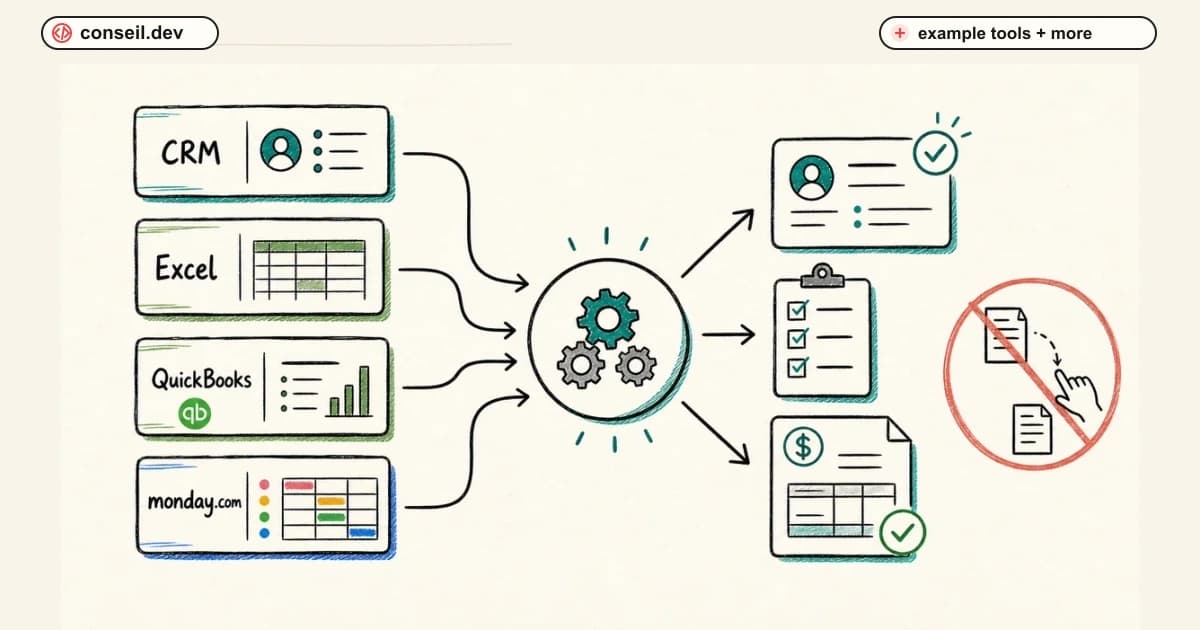
If you run a business today, chances are you use several software tools to keep things moving. Your sales team tracks deals in HubSpot or Zoho CRM. Your bookkeeper works in QuickBooks. Your projects live in a tool like Zoho Projects, Asana, or Monday. And somewhere in between, there is a spreadsheet holding it all together.
Each tool does its job well. The problem? They don't talk to each other. The fix is integration: connecting the tools you already use so they share information automatically, without anyone copying and pasting.
The hidden cost of disconnected tools
Here is what that looks like in real life.
A deal closes in your CRM. Someone on your team then has to open QuickBooks and manually create the customer and the invoice. Then they open your project tool and set up the project. Then they email the team to let everyone know.
Every one of those steps is a chance for something to slip: a typo in the customer's name, an invoice that goes out late, a project that never gets created because someone was on vacation.
Multiply that by every deal, every customer update, and every month, and you are losing hours of staff time and creating errors that frustrate your customers.
What integration actually means
Integration simply means connecting the tools you already use so information flows between them automatically.
You don't replace your software. You don't retrain your team on a new platform. Your tools keep doing what they do. They just start sharing information with each other behind the scenes.
Think of it as hiring an invisible assistant who instantly copies the right information to the right place, every single time, without ever making a mistake.
Real examples of integrations we build
Here are common integrations we build for businesses, using tools you may recognize:
- CRM to accounting: A deal is marked "Won" in HubSpot or Zoho CRM, and a customer record and invoice are automatically created in QuickBooks. No retyping, no delays.
- Website to CRM: Someone fills out the contact form on your website, and they instantly appear as a new lead in your CRM, assigned to the right salesperson with a follow-up task already created.
- CRM to projects: When a sale closes, a project is automatically set up in your project management tool with the right tasks, deadlines, and team members.
- Accounting to CRM: When an invoice is paid or overdue in QuickBooks, your sales team sees it inside the CRM, so they never call a customer without knowing their payment status.
- Everything to reporting: Sales, billing, and project data flow into one dashboard, so you stop building reports by copying numbers between spreadsheets.
These are examples, not a fixed menu. The right integration depends entirely on how your business works, whether you use Zoho, HubSpot, QuickBooks, or something else entirely. If your back office runs on accounting software, this often pairs with the automation we build for finance and accounting teams.
What this looks like in practice
We recently helped a logistics company connect their CRM to QuickBooks. What used to take their office manager about 12 hours a week, re-entering won deals as customers and invoices, now happens the moment a deal closes. Those hours go straight back into real work.
That is the pattern we see again and again: the savings are not theoretical. They show up in the very first week the connection goes live. You can see how we scope and ship these projects before committing to anything.
What you get out of it
- Time back: Tasks that took 15 minutes of copying and pasting now take zero.
- Zero data-entry mistakes: Information is entered once and flows everywhere it is needed.
- Instant customer response: Leads get followed up in minutes, not days.
- One version of the truth: Sales, accounting, and operations all see the same up-to-date information.
- Better decisions: Reports reflect what is actually happening right now.
"Can't I just do this myself with Zapier?"
It's a fair question. For a single, simple connection, a DIY tool can get you started, and we'll tell you honestly when that's all you need.
The trouble starts when a connection silently breaks while you're on vacation, an app changes its rules, or one automation needs to talk to three others without creating duplicates. That's when a do-it-yourself setup turns into a part-time IT job. We build robust integrations, handle the edge cases, and maintain them as your tools update, so you never have to play part-time IT director.
Your data stays secure
You are trusting these connections with customer records and financial data, so security is not an afterthought. We use industry-standard encryption and authenticate every connection properly, so your information passes safely between tools without ever being exposed. It is the same approach we take to security and confidentiality on every project.
What working with us looks like
You don't need to be technical, and you don't need to prepare anything special. Here is how it goes:
- We listen. You walk us through how your team works today and where the repetitive, manual steps are.
- We map it out. We show you, in plain language, what information will flow where, and you approve it before anything is built.
- We connect your tools. Your team keeps working as usual. Nothing is disrupted.
- We test together. We verify everything with you using real scenarios before going live.
- We stay available. As your business changes, your integrations can change with it.
Most integrations go live in days, not months, and we scope the work up front so you know exactly what you're getting.
Ready to stop copying and pasting? Book a free 15-minute workflow audit. Tell us which tools you use, and we'll map out exactly how much time you could save by connecting them, in plain English, with zero tech jargon.